Plan something new with SolveStudio
Explore a hockey management app, a landscaping website, a business web app or another software idea. Choose Mobile app, Web app or Website during guided discovery, then describe your users, goals and requirements.

Software planning, with human oversight
Explore your application idea, clarify what it needs to do, and prepare a Blueprint for review.
No account is required to explore the public planning experience. Open SolveStudio through RayAI to continue in your authorized workspace.
Your draft does not authorize development or release. Project scope, pricing and next steps are agreed after review.

Web + Agent
Plan your application and review the next steps.
Start with your goal
Describe what you want to create in your own words. You do not need an exact product name or special phrase.
Explore a hockey management app, a landscaping website, a business web app or another software idea. Choose Mobile app, Web app or Website during guided discovery, then describe your users, goals and requirements.
For project status, available QA reports, testing results or release readiness, sign in through RayAI and use your authorized project workspace. Private client and project information is not available on this public page.
Studio Agent guided discovery helps organize your requirements and Blueprint. Declared screen previews illustrate design and navigation; they require separate review and implementation. Automatic AI screen generation is currently unavailable.
Need help improving a website or turning an idea into software? Start with planning or contact SolveMotion Labs. Scope, pricing, development and deployment require their separate human decisions.
Plan the practical details
Guided discovery helps you describe your preferences before a proposal is agreed. Discuss who owns and manages each part of your software delivery.
Describe your existing environment or a managed-hosting preference, along with any database, API and service needs.
Identify domain ownership, registration and renewal responsibility. Describe scoped DNS and deployment access procedures without entering passwords or access keys.
Discuss backup, maintenance, support, migration and transfer responsibilities so they can be recorded in the proposed agreement.
Discuss recurring domain, hosting and third-party costs. Any optional hosting or Care proposal records its own actual price, terms and responsibilities and requires separate agreement.
Planning answers are preferences. Saving or approving a project proposal does not select an optional service, start billing, authorize provisioning or establish deployment and rollback readiness.
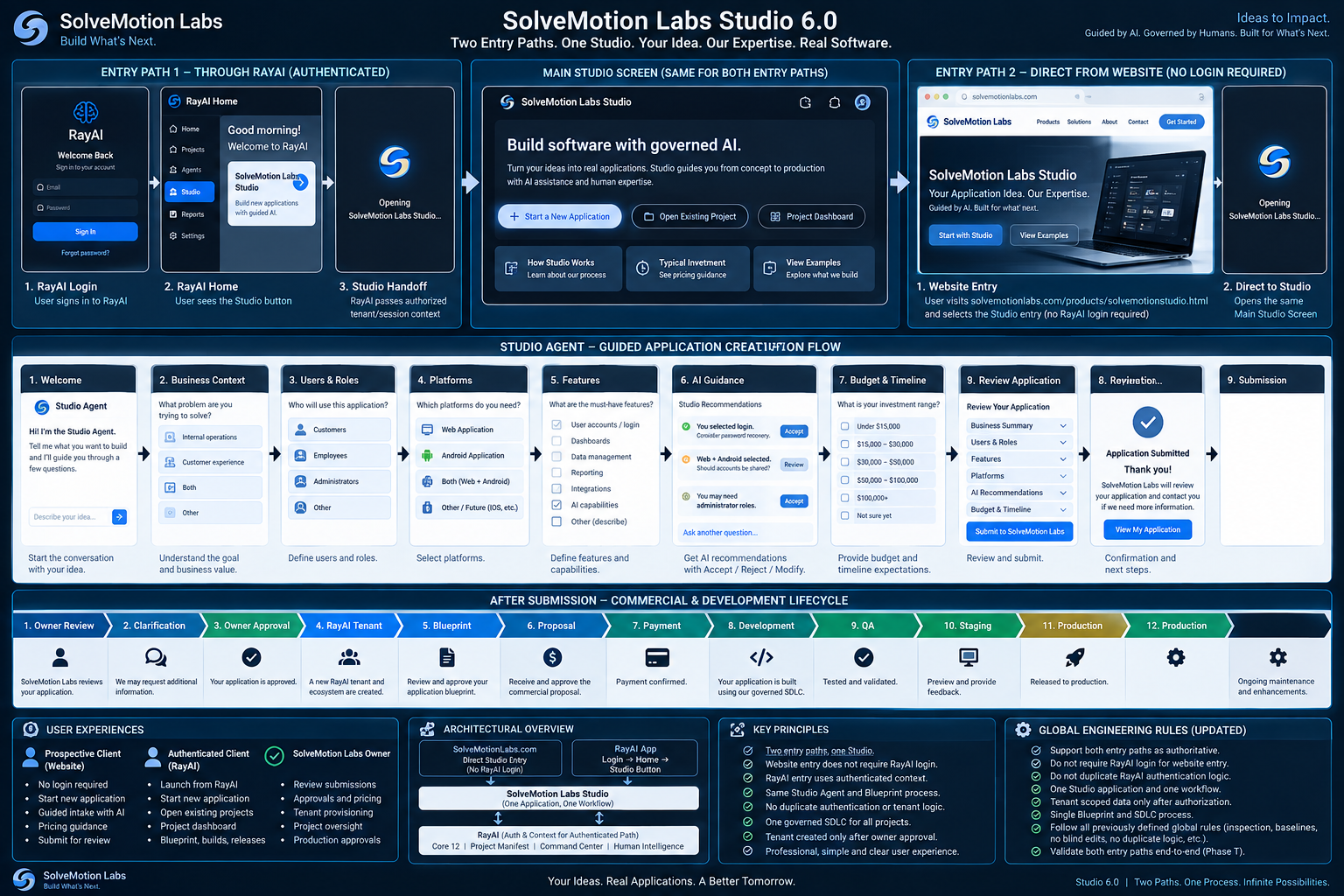
Canonical Studio workflow
Discovery → Requirements → Blueprint → Review → Owner Approval → Client Review → Proposal → Client Approval → Commercial/Payment State → Development Authorization → Delivery.
These are distinct review and authorization stages, not automatic transitions or a promise that every project has reached them. Proposal approval and a payment record do not independently grant build, deployment or private workspace authority.
This workflow shows the project process. Each stage requires its own evidence and human decisions. Creating a draft does not approve payment, development, hosting or release.
Studio illustration
Concept workflow illustration, not a current application screenshot. Declared screens, generated requirements and planned delivery stages require separate review and implementation.